Pages
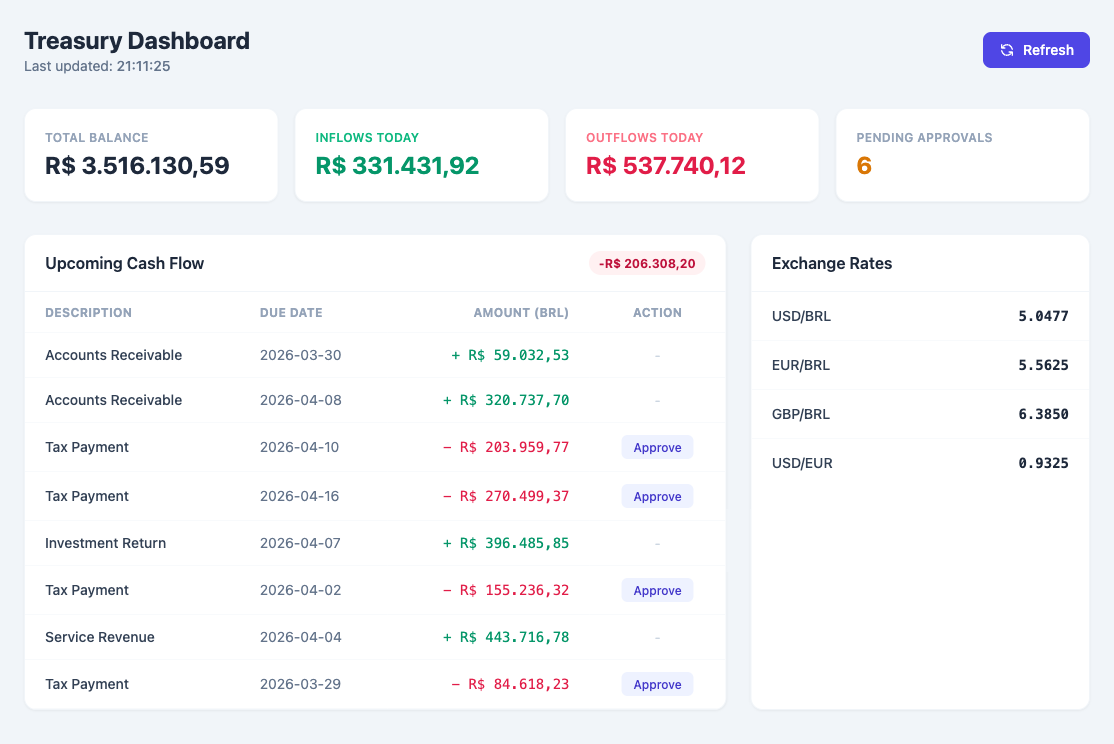
Abstra Pages are Python-powered custom HTML interfaces. Unlike Forms (which use a widget-based UI), Pages give you full control over the HTML, CSS, and JavaScript while keeping the backend logic in Python.
Pages are the recommended choice for dashboards, data visualizations, interactive tools, and any interface that benefits from custom styling (e.g., Tailwind CSS).
How it works
A Page is a Python script that:
- Registers functions using
@register_function— these become callable from the browser as async JavaScript functions - Defines a
__render__function — a special function that returns the HTML string served to the browser
from abstra.pages import register_function

@register_function
def get_data():
    return {"message": "Hello from Python!"}

@register_function
def __render__():
    return """
    <script src="https://cdn.tailwindcss.com"></script>
    <div class="p-8">
        <h1 class="text-3xl font-bold" id="output">Loading...</h1>
        <button onclick="load()" class="mt-4 bg-blue-600 text-white px-4 py-2 rounded">
            Refresh
        </button>
    </div>
    <script>
    async function load() {
        const data = await get_data();
        document.getElementById("output").textContent = data.message;
    }
    load();
    </script>
    """
Request flow
- GET requests call
__render__()and return the HTML with auto-generated JS function stubs - POST requests call the specified registered function and return JSON
- Generator functions are streamed as NDJSON — the JS stub becomes an
async function*(async generator)
The __render__ function is not exposed as a JavaScript function — it can only be called by the server on GET requests.
Streaming with generators
If a registered function is a Python generator (uses yield), it will be streamed to the browser chunk by chunk. You can consume the stream in three ways:
from abstra.files import get_persistent_dir
from abstra.pages import register_function

@register_function
def read_large_file():
    with open(get_persistent_dir() / "big_data.csv") as f:
        for line in f:
            yield line

@register_function
def __render__():
    return """
    <pre id="output"></pre>
    <script>
    // Option 1: .forEach — works in any <script> tag
    read_large_file().forEach(line => {
        document.getElementById("output").textContent += line;
    });
    </script>
    """
You can also use for await...of inside a <script type="module"> for top-level await:
<script type="module">
const el = document.getElementById("output");
for await (const line of read_large_file()) {
    el.textContent += line;
}
</script>
Or collect everything at once with await:
const lines = await read_large_file(); // array of all chunks
This is useful for:
- Large files — stream data without loading it entirely into memory
- Progress updates — yield status messages as a long task progresses
- Real-time logs — stream log lines to the browser as they happen
Creating a Page
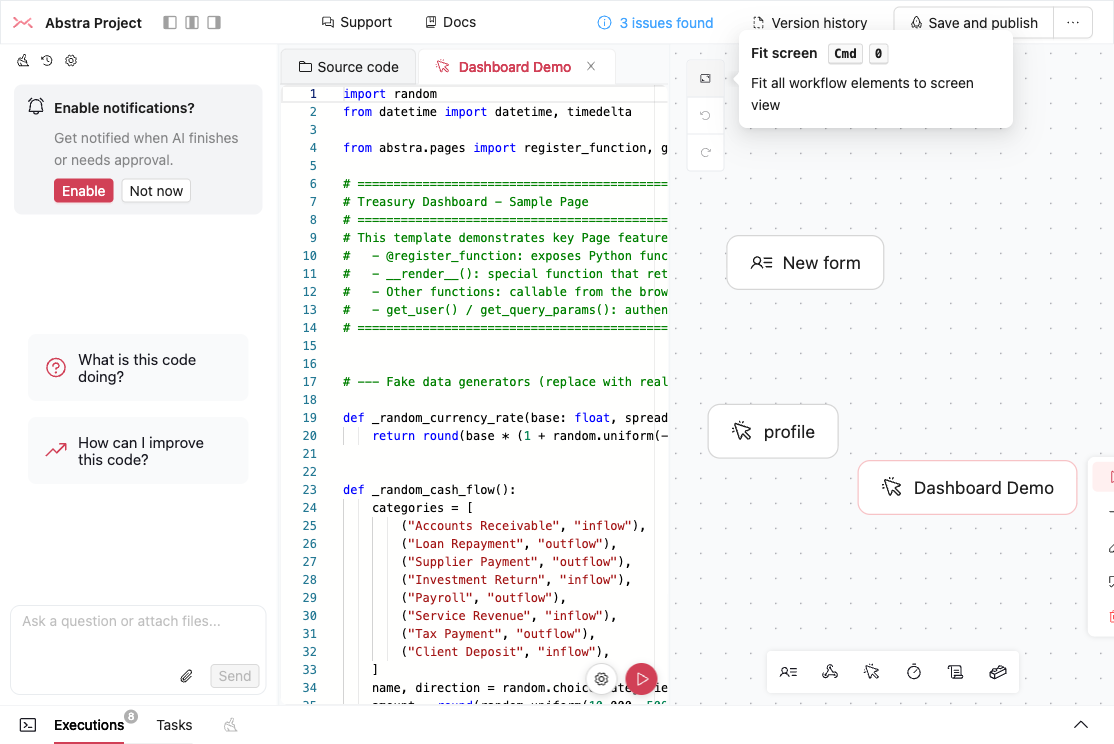
Drag the Pages icon from the workflow toolbar onto the canvas, or press the U keyboard shortcut.

The page appears in the workflow canvas alongside forms, hooks, and other stages.
Running and testing
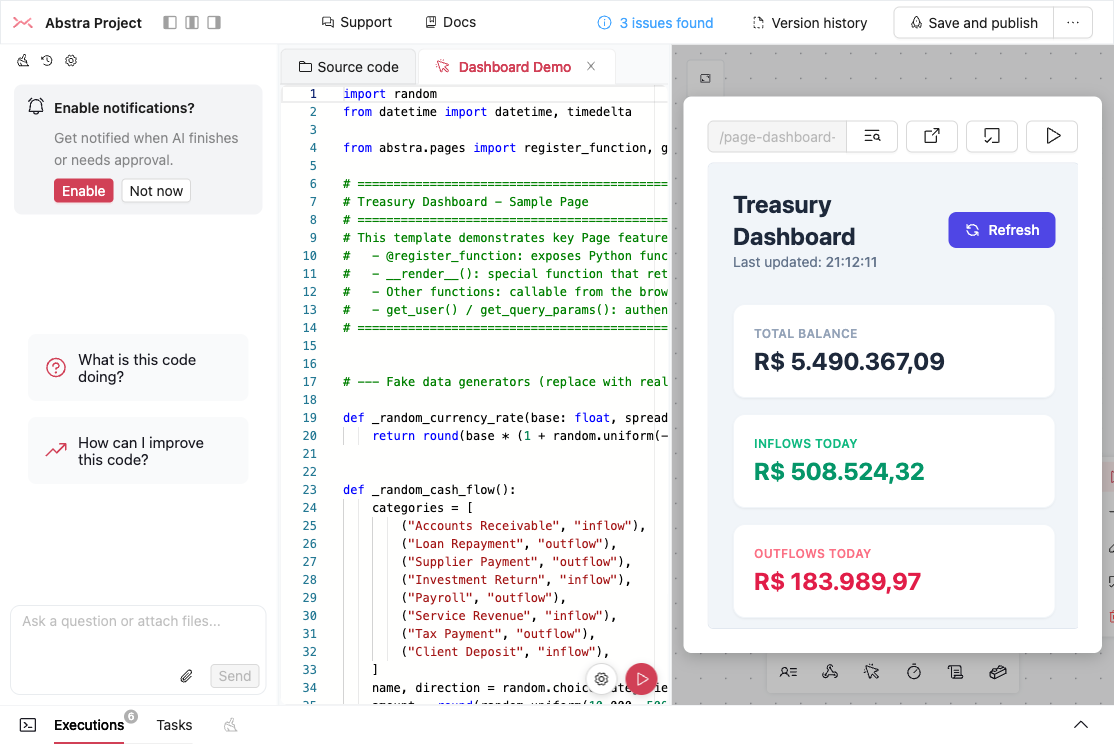
Click on a page node and select Run to preview it in the editor. The PageTester shows the rendered HTML in an iframe with a toolbar for URL preview, query params, fullscreen, and tasks.
Pages vs Forms
| Feature | Pages | Forms |
|---|---|---|
| UI control | Full HTML/CSS/JS | Widget-based (pre-built components) |
| Styling | Any CSS framework (Tailwind recommended) | Abstra theme system |
| Best for | Dashboards, custom UIs, data viz | Step-by-step data collection |
| Backend calls | @register_function → async JS | Widget events → Python state |
| Validation | Custom (in JS or Python) | Built-in widget validation |
| File uploads | Recommended — file bytes arrive in-memory | Built-in FileInput widget; avoid reading files across steps |
| Multi-step flows | Custom (SPA-style) | Built-in with run() steps |
Rule of thumb: Prefer Pages for new interfaces — data display, custom UIs, and any flow that uploads files. Use Forms when a widget-based wizard for structured input is all you need; for flows that upload and process files, prefer Pages.
Static files
Use register_static to serve local files (JS, CSS, images, etc.) from your page. It copies the file to a public directory with a content-hashed URL for automatic cache busting.
from abstra.pages import register_function, register_static

@register_function
def __render__():
    js_url = register_static("code.js")
    css_url = register_static("styles.css")
    logo_url = register_static("logo.png")
    return f"""
    <link rel="stylesheet" href="{css_url}">
    <img src="{logo_url}" alt="Logo">
    <h1>My Page</h1>
    <script src="{js_url}"></script>
    """
register_static accepts str or any os.PathLike (e.g., pathlib.Path). The returned URL is a subpath of the page itself (e.g., /_page/my-page/_static/code.a1b2c3d4e5f6.js) — the hash changes when the file content changes, so browsers always get the latest version.
This is useful for:
- Custom JavaScript — keep JS in
.jsfiles with proper syntax highlighting - CSS stylesheets — serve local CSS without CDN dependencies
- Images and assets — reference local images directly from your HTML
Project structure best practices
For anything beyond a simple page, keep each concern in its own file: HTML templates, CSS styles, JavaScript logic, and Python backend — each separate. Extract shared UI patterns into reusable helper functions.
Recommended file layout
my-project/
├── page_dashboard.py          # Python logic only
├── page_settings.py
├── templates/
│   ├── base.html              # Shared HTML shell
│   ├── dashboard.html         # Page-specific markup
│   └── settings.html
├── static/
│   ├── css/
│   │   ├── base.css           # Shared styles
│   │   └── dashboard.css      # Page-specific styles
│   └── js/
│       ├── common.js          # Shared utilities (toast, escapeHtml, etc.)
│       └── dashboard.js       # Page-specific behavior
├── lib_components.py          # Shared UI helpers (header, toast, breadcrumb)
└── lib_jinja.py               # Jinja2 rendering helper
Jinja2 rendering helper
Create a small helper to load and render templates:
# lib_jinja.py
import os
from jinja2 import Environment, FileSystemLoader

_TEMPLATES_DIR = os.path.join(os.path.dirname(__file__), "templates")
_env = Environment(loader=FileSystemLoader(_TEMPLATES_DIR))

def render_template(template_name: str, **context) -> str:
    template = _env.get_template(template_name)
    return template.render(**context)
Base template
The base template links shared CSS and JS files, and defines blocks for page-specific assets:
{# templates/base.html #}
<!DOCTYPE html>
<html lang="en">
<head>
    <meta charset="UTF-8">
    <meta name="viewport" content="width=device-width, initial-scale=1.0">
    <title>{{ title | default("My App") }}</title>
    <script src="https://cdn.tailwindcss.com"></script>
    <link rel="stylesheet" href="/static/css/base.css">
    {% block head_extra %}{% endblock %}
</head>
<body class="bg-slate-50 min-h-screen">
    {% block body %}{% endblock %}
    <script src="/static/js/common.js"></script>
    {% block scripts %}{% endblock %}
</body>
</html>
Page template — HTML only
Templates contain only markup — no inline <script> or <style> blocks. JS and CSS live in their own files.
{# templates/dashboard.html #}
{% extends "base.html" %}

{% block head_extra %}
<link rel="stylesheet" href="/static/css/dashboard.css">
{% endblock %}

{% block body %}
{{ header | safe }}
<main class="max-w-4xl mx-auto p-8">
    <h2 class="text-xl font-bold mb-4">Dashboard</h2>
    <div id="stats"></div>
</main>
{{ toast | safe }}
{% endblock %}

{% block scripts %}
<script src="/static/js/dashboard.js"></script>
{% endblock %}
JavaScript — own file
// static/js/dashboard.js
async function loadStats() {
    const data = await get_stats();
    document.getElementById("stats").innerHTML = `<p>${data.total} items</p>`;
}
loadStats();
CSS — own file
/* static/css/dashboard.css */
#stats {
    min-height: 200px;
}
Shared JS utilities
// static/js/common.js
function showToast(msg, type = "success") {
    const toast = document.getElementById("toast");
    document.getElementById("toastMessage").textContent = msg;
    toast.classList.remove("translate-y-20", "opacity-0");
    setTimeout(() => toast.classList.add("translate-y-20", "opacity-0"), 3000);
}

function escapeHtml(text) {
    if (!text) return "";
    const div = document.createElement("div");
    div.textContent = text;
    return div.innerHTML;
}
Page Python file — logic only
# page_dashboard.py
from abstra.pages import register_function
from lib_jinja import render_template
from lib_components import render_header, render_toast

@register_function
def get_stats():
    return {"total": 42}

@register_function
def __render__():
    header = render_header(title="Dashboard", icon="📊")
    toast = render_toast()
    return render_template("dashboard.html", header=header, toast=toast)
Shared UI components
Extract repeated UI patterns (headers, toasts, modals, breadcrumbs) into Python helper functions that return HTML fragments:
# lib_components.py
from abstra.pages import get_user

def render_header(title: str, icon: str = "") -> str:
    user = get_user()
    email = user.email if user else "Guest"
    return f"""
    <header class="bg-white border-b border-slate-200 sticky top-0 z-10">
        <div class="max-w-7xl mx-auto px-6 flex items-center justify-between h-16">
            <div class="flex items-center gap-3">
                <span class="text-2xl">{icon}</span>
                <h1 class="text-xl font-bold">{title}</h1>
            </div>
            <span class="text-sm text-slate-600">{email}</span>
        </div>
    </header>
    """

def render_toast() -> str:
    return """
    <div id="toast" class="fixed bottom-4 right-4 translate-y-20 opacity-0 transition-all z-50">
        <div class="bg-slate-800 text-white px-6 py-3 rounded-lg shadow-lg">
            <span id="toastMessage"></span>
        </div>
    </div>
    """
Note: The showToast function lives in static/js/common.js, not inline in the HTML component — keeping JS out of Python strings.
This approach keeps each language in its own file: Python for logic, HTML for structure, CSS for styling, JS for behavior. It makes templates easy to edit visually, enables syntax highlighting everywhere, and lets you share patterns across pages without duplicating code.
Sharing layout across multiple pages
A common pattern is an app where several Pages share a navbar or sidebar — for example, a financial dashboard with Indicators, Cash Flow, and Default rate sections, each one its own Page.
It can be tempting to build a "main" Page that holds the sidebar and embeds the active section in an <iframe>. Avoid this: every Page route already renders inside the project's own chrome, so nesting one Page inside another shows the chrome twice — duplicated navbars and breadcrumbs, broken in-page navigation, and a split auth/scroll context.
The same base.html from Project structure best practices can host the shared sidebar. Each Page extends it and renders its own content block, so navigation between sections becomes plain links to each Page's clean public path (e.g. <a href="/cash-flow">) and the sidebar appears exactly once. Never link to /_page/...: that is an internal RPC route that serves the bare page without the app shell, breaking navigation and auth.
Sidebar slot in the base template
Wrap the existing body block in a flex layout so the sidebar sits next to the page content:
{# templates/base.html — body updated to hold the sidebar #}
<body class="flex bg-slate-50 min-h-screen">
    {{ sidebar | safe }}
    <main class="flex-1 p-8">
        {% block body %}{% endblock %}
    </main>
    <script src="/static/js/common.js"></script>
    {% block scripts %}{% endblock %}
</body>
Sidebar helper
Render the sidebar from lib_components.py, marking the active section:
# lib_components.py
def render_sidebar(active: str) -> str:
    items = [
        ("dashboard", "Dashboard"),
        ("cash-flow", "Cash Flow"),
        ("default-rate", "Default rate"),
    ]
    links = "".join(
        f'<a href="/{slug}" class="block p-2 rounded {"bg-slate-700 font-bold" if slug == active else ""}">{label}</a>'
        for slug, label in items
    )
    return f'<aside class="w-56 p-4 bg-slate-900 text-white">{links}</aside>'
Cash Flow page template
Each section's template extends the base and fills the body block — same pattern as dashboard.html above:
{# templates/cash_flow.html #}
{% extends "base.html" %}

{% block body %}
<h2 class="text-xl font-bold mb-4">Cash Flow</h2>
<div id="cash-flow-chart"></div>
{% endblock %}
Cash Flow page Python file
Render the template with the sidebar marking this section as active:
# page_cash_flow.py
from abstra.pages import register_function
from lib_jinja import render_template
from lib_components import render_sidebar

@register_function
def __render__():
    return render_template(
        "cash_flow.html",
        title="Cash Flow",
        sidebar=render_sidebar(active="cash-flow"),
    )
Repeat the template + Python file pair for each section (page_indicators.py, page_default_rate.py), passing the matching active value to render_sidebar. The sidebar lives in one place; each Page is its own route.